Not Sure Which HDR Mode to Use on Your MSI OLED Monitor - True Black, Peak 1000 nits, or EOTF Boost?
Monitors
OLED monitors offer unmatched contrast and stunning colors, making them the top choice for HDR gaming and entertainment. MSI OLED displays come equipped with multiple HDR modes, including True Black 400 / 500, Peak 1000 nits, and our newly introduced EOTF Boost.
With so many options available, it’s easy to feel overwhelmed when deciding which HDR mode is best for you.

In this article, we’ll walk you through the key benefits of each HDR mode and explain which scenarios they’re best suited for, helping you find the ideal HDR setting for your needs.
True Black 400/500
HDR True Black 400/500 are the certification standards established by VESA specifically for OLED displays. According to the specification, the minimum peak luminance must reach at least 400 / 500 nits, while the maximum black level luminance must stay below 0.0005 nits. This ensures ultra-deep blacks and exceptional detail in dark scenes — one of the signature advantages of OLED technology. While HDR True Black 400 / 500 doesn’t require the same peak brightness as Peak 1000 nits (which demands 1000 nits), it enforces a much stricter standard for black level luminance. As a result, it still delivers excellent contrast performance. Even with a lower peak brightness, you won’t feel like the image is lacking in visual impact or brightness.
When should you use True Black 400 or 500 on MSI OLED Monitors?
If you typically use your monitor in bright environments, we recommend using True Black 400 / 500. While Peak 1000 nits boasts peak brightness up to 1000 nits, it’s important to note that this level is only achievable under APL 3% conditions, meaning just 3% of the screen is displaying bright content.
In real-world usage, many scenes have a much higher average picture level (APL), and in these situations, True Black 400 / 500 can appear brighter than Peak 1000 nits. This makes it a great choice for maintaining clarity and vibrancy in brighter scenes.
In real-world usage, many scenes have a much higher average picture level (APL), and in these situations, True Black 400 / 500 can appear brighter than Peak 1000 nits. This makes it a great choice for maintaining clarity and vibrancy in brighter scenes.
Peak 1000 nits
Unlike True Black 400 / 500, which was designed specifically for OLED displays, Peak 1000 nits is primarily for LCD displays. Peak 1000 nits requires a minimum peak luminance of 1000 nits and a maximum black level luminance below 0.05 nits. Compared to True Black Mode, the black level standard is more lenient. This is due to inherent hardware limitations of LCD panels, which cannot turn off individual pixels like OLED displays can, resulting in less pure blacks and slightly elevated dark tones.
When should you use Peak 1000 nits on MSI OLED Monitors?
If you often watch or play content set in predominantly dark environments — such as nighttime scenes, dungeons, or dimly lit interiors — we recommend using Peak 1000 nits.
In these scenarios, the Average Picture Level (APL) tends to stay low, allowing the display to unleash higher brightness for highlights like torches, fire, or sudden flashes of light.
When the APL drops to around 3%, the monitor can even reach the full 1000 nits peak brightness that Peak 1000 nits is designed for. This creates a dramatic contrast between bright highlights and dark backgrounds, enhancing immersion and delivering a truly cinematic HDR experience.
In these scenarios, the Average Picture Level (APL) tends to stay low, allowing the display to unleash higher brightness for highlights like torches, fire, or sudden flashes of light.
When the APL drops to around 3%, the monitor can even reach the full 1000 nits peak brightness that Peak 1000 nits is designed for. This creates a dramatic contrast between bright highlights and dark backgrounds, enhancing immersion and delivering a truly cinematic HDR experience.
MSI's Exclusive HDR Mode – EOTF Boost
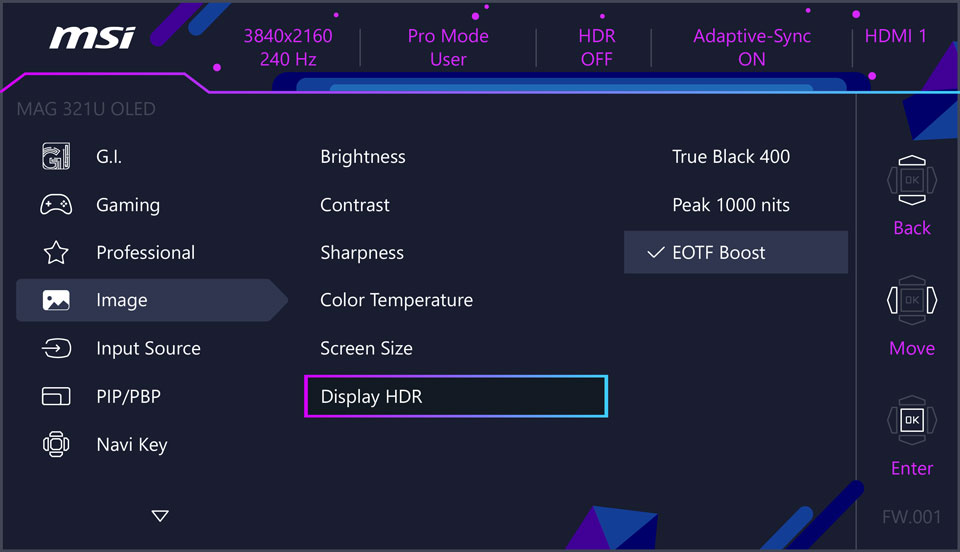
Earlier, it was mentioned that while Peak 1000 nits can reach a peak brightness of 1000 nits, its overall brightness in bright scenes might be lower than True Black 400 / 500. This is a common characteristic of QD-OLEDs and something some users hope to improve. Therefore, MSI developed a new HDR mode called EOTF Boost, which is MSI's proprietary software algorithm.
What makes EOTF Boost different?
Compared to Peak 1000 nits, EOTF Boost delivers higher brightness. Under the same APL (Average Picture Level) conditions, using EOTF Boost results in higher brightness compared to Peak 1000 nits. For users who previously desired higher brightness when using Peak 1000 nits mode, you can now switch to EOTF Boost Mode to experience a brighter display. As shown in the image below, the screen in the middle — running in EOTF Boost mode — appears noticeably brighter than the ones on either side using Peak 1000 nits, respectively.

When should you use EOTF Boost on MSI Monitors?
Under the same APL (Average Picture Level) conditions, EOTF Boost provides higher brightness than both Peak 1000 nits and True Black 400 / 500, making it suitable for a wider range of scenarios. In short, if you don't have specific requirements, EOTF Boost is suitable for out-of-the-box use and can deliver excellent HDR visuals in various HDR scenes.
MAG Series
Model
EOTF BOOST Firmware Ready
MAG 271QPX QD-OLED E2
Aug/4
MAG 271QP QD-OLED X24
Aug/4
MAG 272UP QD-OLED X24
Aug/4
MAG 321UP QD-OLED
Aug/4
MAG 321CUP QD-OLED
Aug/4
MAG 271QPX QD-OLED
Aug/E
MAG 271QP QD-OLED X28
Aug/E
MAG 273QP QD-OLED X24
Aug/E
MAG 321UPX QD-OLED
Aug/M
MAG 341CQP QD-OLED
Aug/M
MAG 272QPW QD-OLED X28
Implemented in MP
MAG 272QP QD-OLED X50
Implemented in MP
MAG 322UP QD-OLED E16
Implemented in MP
MPG Series
Model
EOTF BOOST Firmware Ready
MPG 272URX QD-OLED
Aug/M
MPG 321URX QD-OLED
Aug/M
MPG 341CQPX QD-OLED
Aug/M
MPG 271QRX QD-OLED
Aug/E
MPG 321URXW QD-OLED
Aug/E
MPG 321CURX QD-OLED
Aug/E
MPG 322URX QD-OLED
Aug/E
MPG 491CQP QD-OLED
Aug/E
MPG 491CQPX QD-OLED
Aug/E
MPG 271QR QD-OLED X50
Implemented in MP
MEG Series
Model
EOTF BOOST Firmware Ready
MEG 342C QD-OLED
Aug/E